Tuesday, August 31, 2010

Concept: Third Draft

This is a simplified model of the first draft, the permutations and combinations of which allow children to animate characters, perform actions, modify them. and therefore explore the mathematics involved.

THE 5 BLOCKS:

People, Animals (Characters)
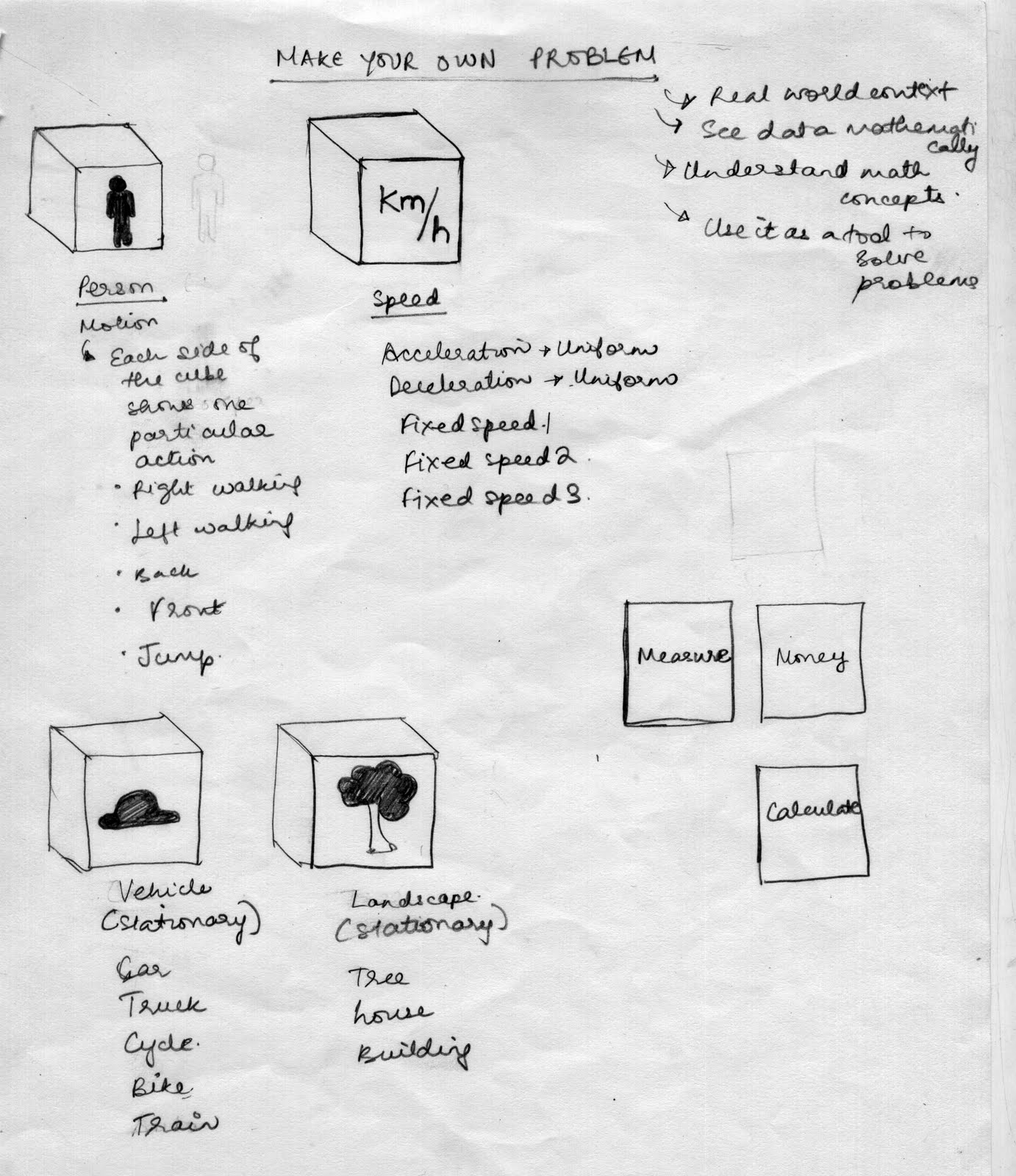
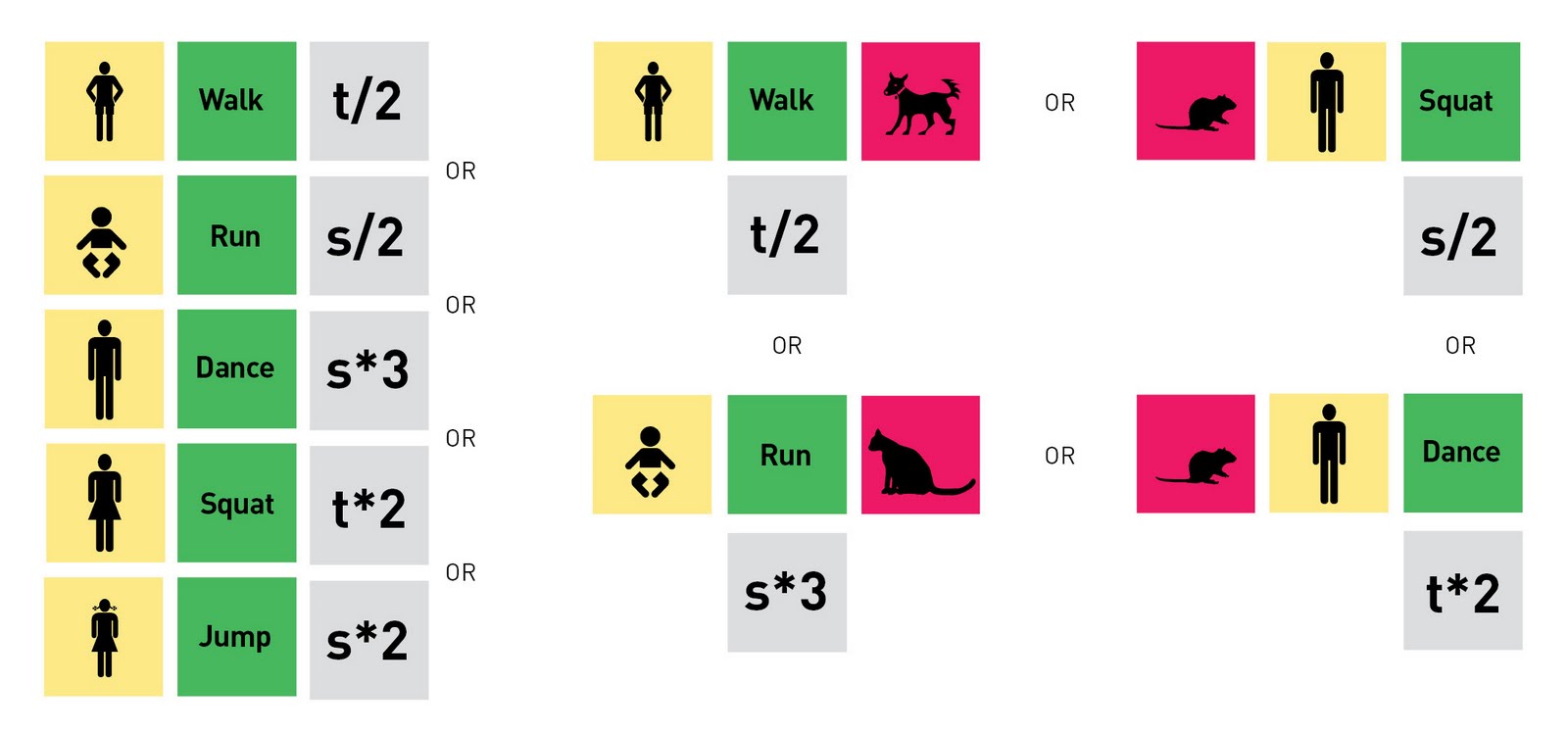
The player starts with choosing a person/animal/both. Each cube has 5 working sides, each representing a different person/animal.


Actions (For characters)
These can be used to give the character properties- Eg. Jump, Run, Dance etc.


Modifiers (For actions)
These are tools that are applied to actions, to increase/decrease the rate/time etc mathematically.


Comparisons (For characters)
These are tools that can be used to compare sizes/weights of different characters.


THE MODEL:
 

CATEGORIES:

HOW TO USE:
Pick your character/s:
Start by picking a person or/and animal.
Character properties: Name, Age, Weight and Height, Description.


Comparisons:
Compare the size/weight/height of characters. You can see these comparisons in different representations, eg. percentages, fractions, etc. therefore learning about the relationship between different mathematical tools.


Actions:
Animate your character by using the ‘Action’ block. When the action is placed next to the character, the character is performs the corresponding action. If the action block is placed BETWEEN two characters, both characters perform the same action (Diagram 2). If it is placed near one, only that one is performs the action (Diagram 3).


Modifiers:
Modify your actions by adding the ‘Modifier’ block. Watch your character perform the action at a faster/slower rate, calculate the time taken, the distance traversed etc.

KEY ELEMENTS:
Characterization and Humour

EXAMPLES OF NARRATIVES:
Make your own problem:
Make a man run, check the distance covered.
Then make a mouse run at the same speed, and check the distance covered. What is the difference? Why? Then double the speed of the mouse and see the difference. Try the same with an elephant.

Humourous situations:
Make a man jump, add a mouse to the scene, and then double the speed of the man!
Then make the man run away from the mouse, and draw the mouse running at triple the speed of the man!

Random:
Make a baby dance, in slow motion. Then make him squat, and increase the speed. Then try making the horse dance with the baby!

Monday, August 30, 2010

Simplify

Figuring out the system and interactions:
To make it easier to understand how the model works, I started exploring the permutations and combinations with building blocks. I realized that the system is still quite complicated, and including different scenarios and situations which interact with each other would be too difficult to interact with, as well as program.


Meeting with Victor:
Adding stories within the tool is not necessary- Let the child explore and play with the options and create their own narrative.
In the current system, there are fixed options within the scenario, which diverts from the main focus of “mathematics”-Too complex (to understand, interact with, and program)
SIMPLIFY- There can be many options with just 3-4 blocks, and is easier for a child to understand/play with.

Friday, August 27, 2010

Concept: Second Draft

Loopholes in the first draft:
After speaking to some people about my earlier concept, I realized that it was a little clinical in its approach- Unless a child was motivated enough, with a high interest in mathematics, he wouldn't want to explore the possibilites of the blocks. I needed to make the interface more user friendly and fun- something that a child would be interested in playing with, and therefore engaging with mathematics. This version focusses more on situations, characters and storytelling, still maintaining the interactivity and exploratory aspect of the earlier version.

Rethinking the concept:


Making an interactive mathematical narrative; building your own story with the help of scenarios. All interactions and scenarios focus on the application of math in everyday situations.


There are four types of building blocks- You (Character), Travel, People (This includes 3 blocks of real world people and scenarios that can be interacted with) and Places (3 blocks of places where children can learn about the application of math). Each face of each block corresponds to a different property of that person/scenario. (For example, the “Travel” block, will have an auto, car, train and bus on the faces of the block respectively)

You begin by choosing a character, and this character then interacts with different people/places/transport mathematically by arranging the cubes (with respective faces) in any order- Like building a storyboard.


Children can use this device to build their own stories, engage with mathematics, and relate it to the real world.


Mediums and Technology:
Stop motion/Basic animation
Motion graphics
Augmented reality
Projection mapping
Multi touch screen

Saturday, August 21, 2010

Rethinking structure


Categories (In progress):


Examples of permutations (Scenarios):


Narrative options:
  •  Is it a learning tool? A toy? Or a game? Or all?
  • Make your own problem: Setting the scene for them to create their own problem.
  • Goal: Single Goal/Multiple goals
  • Nudge
  • Reward or threat-Clues
  • Travel- Journey- Destination
  • Competition: Permutations/combinations to reach the respective place fastest
  • Fastest way to get somewhere
  • Narrative in parts: Level one/Level two
  • Building characters, building landscapes/scenarios
  • Have a fixed amount of money through a place- Simulated
  • Each step requires the child to calculate in order to progress
  • Understanding daily situations in the context of mathematics
  • Demonstrating a concept directly vs implied

Wednesday, August 18, 2010

Concept: First Draft

INTERACTIVE BUILDING BLOCKS: Augmented Reality

A set of blocks representing a real world scenario, which can be used to build an interactive “mathematical” narrative. These blocks are categorized into "Elements", "Properties" and "Tools".
  • Elements will bring a characters/objects into the narrative.
  • Properties will add Motion/Action/Direction to the elements.
  • Tools will calculate the mathematics corresponding to the properties- For example, measuring, comparison etc.
  • Each face of each block corresponds to an action/animation. Each cube has 5 working faces (Options within that category- For example: The different sides of the “Character” cube will have a man, woman, child, dog, insect respectively)
  • The blocks can be placed in any combination to form an interactive “mathematical” narrative. There will also be a "Scenario" (Marketplace, Bank, Kitchen, Travel) block to set the landscape and goal.

Medium: Using stop motion animations with superimposed graphics.

Why this:
  • Real world context: Looking at data mathematically, directly relating to application. Showing the mathetmatics in common daily scenarios.
  • Exploring how different combinations/situations affect each other because of mathematics.
  • The blocks are categorized into “Elements”, “Properties” and “Tools”, so it is made clear that the interactive narrative is driven by mathematics.
  • Can be used to discover, explore and engage with mathematics through the story created- Permutations and combinations- Make your own problem.
  • Can be used as a tool to solve math problems- which will help them understand the context, and relate them to real world examples.
  • Focussing on basic mathematics and scenarios, but can be taken forward to demonstrate a range of concepts.
  • Shows connections between different mathematical tools (Fractions, Percentages, Decimals etc.)

How it works:
  • Each face of each block has a marker, which corresponds to a particular animation.
  • These animations are projected on the screen when that face is recognized by the webcam. (For example, face up. When the "Character" block is placed, the side which is facing up will be recognized. To change the character that appears, that respective side should be faced up) 
  • The animations, as well as all the permutations and combinations of interactions between 2 or more blocks will have to be programmed to behave according to the narrative/sequence of events.

Examples:

References: Siftables (Make your own music), Levelhead, Scratch

What I need to work on now:
  • Simplification: Making sure there are only a few blocks, and each permutation and combination works (For example, as of now, the "tree", if placed with "run", will not work)- Reworking categories.
  • Plot: Each landscape will need to have a certain goal/challenge, to make it more exciting for a child- Storyboarding.
  • The form of the "block" is open to change.
  • Figuring out size, the "Play Area"
  • Augmented reality vs projection mapping vs a multitouch screen.
 Feedback would be very helpful :)

    Monday, August 16, 2010

    Design in Education

    Aajwanthi, Priyanka and I gave a presentation to the 2nd, 3rd and 4th years students who were participating in the Index Design Challenge. We spoke about Design in Education, Alternative Learning Methods, and our respective diploma projects in the realm of Design and Learning.

    Friday, August 13, 2010

    Notes

    From the analysis of my research and interviews conducted, these are the points I would to focus on in my product/interface:
    • Drawing connections between different topics in mathematics
    • Mathematics and the real world: Applications
    • Tactile, Dynamic, Interactivity, Engaging

    THE POSSIBLE CONCEPTS/IDEAS THAT THE GAME/APPLICATION CAN BE BASED ON:
    Scenarios: Marketplace, bank, travel, cooking, home, etc. 
    Puzzle: Siftable concept using A.R:- 3D origami?
    Building/construction: (Abstract) Geometry, shapes, angles, 3D, percentages, fractions, decimals, ratio
    Story-based Adventure: Directions, angles, distance speed time, percentages, fractions, decimals, ratio, calculations
    Data Visualization: Real time data or music/dance: Mathematical patterns: Infographics

    SCENARIOS: 
    Marketplace:
    Directions
    Price
    Averages
    Discounts (Simple Discount, Minimum Purchase Discount, Buy one get one Free, Paired Discount, Order Discount)
    Sets
    Percentages
    Fractions
    Time

    Banks
    Interest
    Shares
    Foreign Exchange
    Cooking
    Recipe
    Ratios and Proportion
    Percentages
    Cost
    Budget

    Travel
    Car
    Cost- Petrol
    Budget
    Directions
    Distance, Speed, Time
    (The shortest way to get somewhere in a specified time)

    Home
    Organizing and Sorting
    Measurement
    Budget

    POSSIBLE MEDIUMS:
    • Augmented Reality
    • Tangible user interfaces- Using electronics and programming
    • Screen Application: Data Visualization- Using sensors, arduino and processing

    (I'm working on concept sketches, will upload them shortly.)

    Thursday, August 12, 2010

    Levelhead: Augmented reality


    An augmented reality spatial memory game by Julian Oliver.

    Thinking about form

    Interesting visual styles and formats

    Installation:
    5 sided LCD display:

    Multi-touch interactive surfaces:

    Paper explorations:

    Interactive video installations:

    (I will keep adding to this post as and when I find something interesting)

    Saturday, August 7, 2010

    Siftables- The toy blocks that think

    Toys that inspire learning, innovation — and of course fun! These are the toys of the technological age: they are alive, they think, they perform magic. What were your favorite toys as a kid (or an adult), and what did they inspire in you? David Merrill replaces traditional building blocks with electronic tiles that can add, subtract, compose and create.


    Siftables aims to enable people to interact with information and media in physical, natural ways that approach interactions with physical objects in our everyday lives. As an interaction platform, Siftables applies technology and methodology from wireless sensor networks to tangible user interfaces. Siftables are independent, compact devices with sensing, graphical display, and wireless communication capabilities. They can be physically manipulated as a group to interact with digital information and media. Siftables can be used to implement any number of gestural interaction languages and HCI applications. 

    More about siftables:
    http://sifteo.com/
    http://alumni.media.mit.edu/~dmerrill/siftables.html
    http://tacolab.com/projects/Siftables

    Universcale- Nikon

    An application that helps us 'experience' different sizes. Very interactive; a good example of information design and data visualization.
    http://www.nikon.com/about/feelnikon/universcale/index_f.htm